You saved a track at 320kbps and it sounds exactly like the 128kbps version you already had. You are not imagining it, and your ears are not the problem. Bitrate is one of those specs that everyone quotes and almost nobody explains properly, which is why so many people end up with a music folder three times larger than it needs to be and no audible improvement to show for it.
This guide explains what bitrate actually measures, what the numbers mean in practice, and the one factor that overrides all of them: the file you started with. By the end you will know which setting to pick for any given job, and more usefully, when picking the highest number is a waste of storage.
What bitrate actually measures
Bitrate is how much data an audio file spends on every second of sound, measured in kilobits per second (kbps). A 320kbps MP3 spends 320 kilobits describing each second. A 128kbps MP3 spends 128.
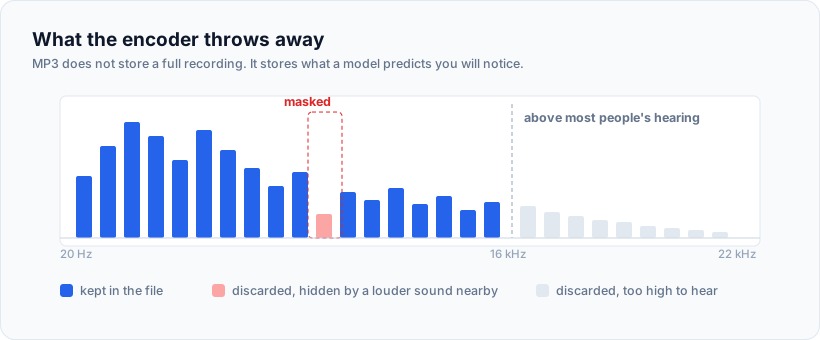
The important word is spends. MP3 is a lossy format, which means it does not store a complete recording. It stores an approximation, and it throws away the parts a psychoacoustic model predicts you will not notice. A loud cymbal crash masks quiet detail happening at the same moment, so the encoder discards that detail. A frequency above your hearing range gets dropped entirely.
Bitrate is the budget for that approximation. A higher budget means the encoder throws away less. It does not mean the encoder adds anything, and that distinction is where most of the confusion starts.
There is also a hard ceiling built into the format itself. 320kbps is the maximum an MP3 can be. There is no 512kbps MP3, no 1000kbps MP3. Any tool advertising one is either mislabelling the file or converting to something that is not MP3.
The four bitrates you will actually meet
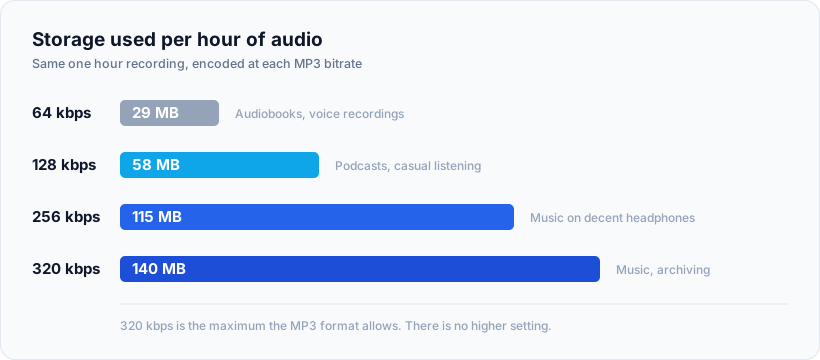
Most tools give you a handful of options rather than a slider. Here is what each one costs you in storage, using real arithmetic rather than rules of thumb. A 320kbps file spends 320,000 bits, which is 40,000 bytes, on every second. Multiply by 3,600 seconds and an hour of audio comes to roughly 144 MB.
| Bitrate | Per minute | Per hour | Best for |
|---|---|---|---|
| 64kbps | ~0.5 MB | ~29 MB | Spoken word, voice memos, audiobooks |
| 128kbps | ~1 MB | ~58 MB | Podcasts, casual listening, phone storage |
| 256kbps | ~1.9 MB | ~115 MB | Music on decent headphones |
| 320kbps | ~2.4 MB | ~140 MB | Music, archiving, critical listening |
Put that in context. A 60 track library at 320kbps runs to roughly 900 MB. The same library at 128kbps is about 360 MB. If you are filling a phone, that gap decides whether the whole collection fits.
For reference, the streaming services you already use sit inside this range rather than above it. Spotify’s highest streaming tier is around 320kbps, and Apple Music’s lossy tier is 256kbps AAC. Nobody is streaming you 1000kbps files.
The ceiling nobody mentions: your source file
Here is the part that gets left out of almost every bitrate guide, and it is the single most useful thing on this page.
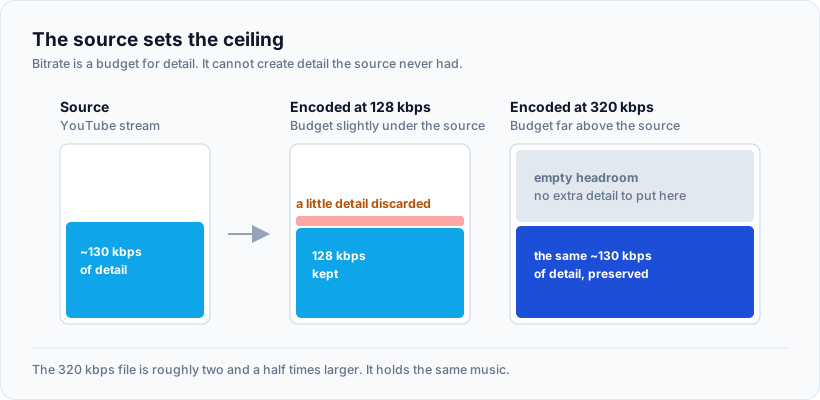
An MP3 can never contain more audio information than the file it was made from.
Bitrate is a budget, not a source of detail. If you encode a recording that only ever contained 128kbps worth of information, setting the encoder to 320 does not invent the missing detail. It simply spends a larger budget describing the same limited material. You get a file that is roughly two and a half times bigger and sounds identical, because there was nothing extra to capture.
This is why the honest answer to “which bitrate should I choose?” always starts with a question back: what are you converting from?
- From a CD rip or a WAV or FLAC file: the source is lossless and holds far more than any MP3 setting can carry. Here 320kbps genuinely captures more than 128kbps, and the choice is real.
- From an already compressed file: the source is the ceiling. Encoding above it wastes space and gains nothing.
What YouTube actually stores, and why it matters here
This trips up a lot of people, because YouTube is where most casual audio saving happens.
YouTube does not store a lossless master for you to extract. It stores compressed audio alongside the video, typically Opus at around 130kbps or AAC at around 128kbps, depending on which stream the platform serves. In round numbers, roughly 128 to 160kbps.
Follow that through and the implication is unavoidable. If the source is a 130kbps Opus stream, then a 320kbps MP3 made from it does not contain 320kbps worth of music. It contains everything the Opus stream had, packaged in a container with plenty of headroom to spare.
So is 320 pointless in that case? Not quite, and this is a genuinely subtle point. There is a second effect worth understanding.
Generation loss, and why the encoder setting still matters a little
Converting one lossy format to another is called transcoding, and it is not free. The second encoder does not know which details the first one already discarded. It applies its own psychoacoustic model from scratch to material that has already been thinned out, and it makes fresh compromises on top of the old ones. That compounding damage is generation loss.
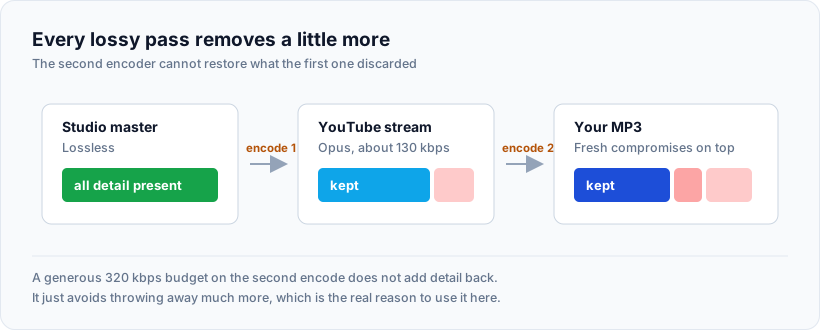
Give the second encoder a tight budget, say 128kbps, and it is forced into aggressive decisions and audible artifacts creep in: smeared cymbals, a hollow quality on sustained notes, a kind of swirling on applause or rain.
Give it a generous budget of 320kbps and it can afford to preserve the source almost exactly as it received it. The output still is not better than the source, but it is much closer to it.
That is the honest case for 320kbps when working from compressed audio. Not “it adds quality”, but “it avoids subtracting any more”. If you want a practical way to try this, converting a YouTube video to MP3 with the bitrate selector visible lets you compare the same source at different settings and hear the difference for yourself, and the estimated file size is shown before you commit so you can see the storage cost of each choice.
When 320kbps is the right call
Pick the maximum when any of these apply:
- You are working from a lossless source. A CD rip, a WAV, a FLAC file. The extra budget captures real detail.
- You are archiving. If this is the copy you intend to keep for years, spend the storage now. Re-encoding later from a degraded file only compounds the loss.
- The material is dense. Orchestral recordings, layered electronic production, live recordings with a lot of room ambience. These are exactly what low bitrates struggle with.
- You are editing. If the audio is going into a video project or a podcast edit and will be encoded again at the end, start with the most headroom you can.
- You have decent playback gear. Wired headphones over about the fifty pound mark, a proper car system, studio monitors.
If most of your listening is music and you would rather not think about it per file, defaulting to 320kbps and forgetting about it is a perfectly reasonable policy. Storage is cheap enough now that the extra 80 MB an hour rarely matters on a laptop.
When you should deliberately choose less
Reaching for the maximum out of habit is a real waste in several common situations.
- Spoken word. Podcasts, interviews, lectures and audiobooks are mostly a single voice in a narrow frequency band. 64kbps or 128kbps handles that comfortably. A 20 hour audiobook at 320kbps eats nearly 3 GB for no benefit at all.
- Phone storage is tight. Halving the bitrate roughly doubles how much fits.
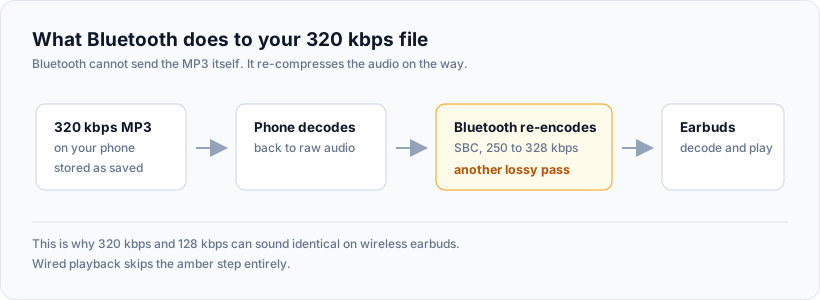
- Listening over Bluetooth. This one surprises people and it is worth understanding properly. Bluetooth cannot transmit your MP3 directly. It decodes the file and re-encodes it on the fly using whatever codec your headphones negotiate, often SBC at around 250 to 328kbps. You are adding another generation of lossy compression at playback. A 320kbps file feeding an SBC connection loses a chunk of the advantage you paid storage for.
- Noisy environments. On a train, in a gym, walking a busy road, ambient noise masks far more detail than the encoder ever did.
- Background listening. Music while you work is not critical listening.
How to check the bitrate of a file you already have
Before re-encoding anything, find out what you are actually holding. Re-encoding a 128kbps file up to 320 is the single most common wasted operation in anyone’s music folder.
On Windows: right click the file, choose Properties, open the Details tab. Bit rate sits under the Audio section.
On Mac: select the file and press Command and I, or open it in Music and check Get Info, then the File tab.
In VLC, on any platform: play the file, then Tools and Codec Information. This is the most reliable of the three because it reads the stream itself rather than trusting metadata, and it also shows you the sample rate and channel count.
One warning worth knowing. A file can be labelled 320kbps and still contain 128kbps worth of audio, because someone upscaled it at some point. The label describes the container, not the quality inside. If you want to check properly, a spectrogram tool like Spek shows you the frequency cutoff. Genuine 320kbps material generally carries content up to around 20kHz. A file that was originally 128kbps shows a hard shelf around 16kHz no matter what the label claims.
Common mistakes worth avoiding
- Re-encoding your existing library to a higher bitrate. This makes every file bigger and every file slightly worse, because you add a generation of loss without adding information. There is no upside.
- Assuming the number on the label is true. See the spectrogram note above.
- Using 320kbps for speech. Enormous files, zero audible gain.
- Converting the same file repeatedly. Every pass through a lossy encoder degrades it further. Keep the best copy you have and export from that each time, rather than converting a converted file.
- Judging quality on laptop speakers. Almost no laptop speaker can reproduce the differences you are listening for. Use headphones or do not bother testing.
- Chasing numbers past the format’s limit. Anything claiming an MP3 above 320kbps is not telling you the truth.
A sensible default policy
If you would rather not decide file by file, this covers almost everything:
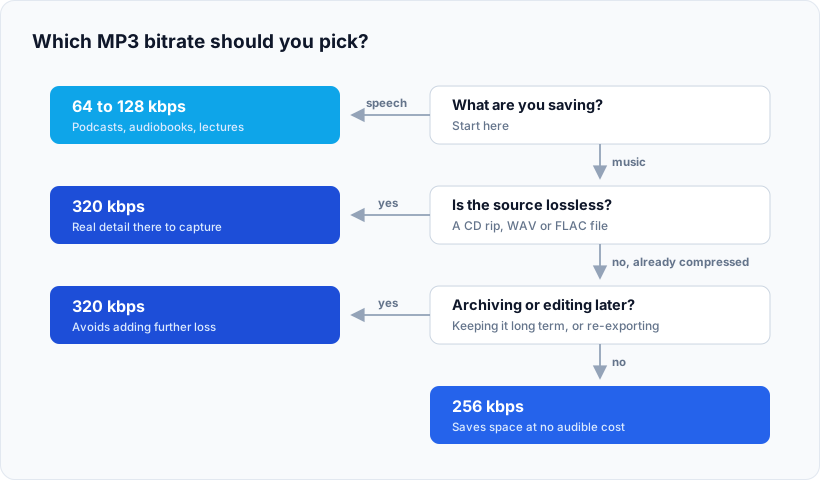
- Music you care about, or anything from a lossless source: 320kbps.
- General music listening on a phone with limited space: 256kbps.
- Podcasts and interviews: 128kbps.
- Audiobooks and voice recordings: 64kbps.
The only real rule underneath all of it: know your source. Everything else follows from that one question.
From a lossless source, yes, and on decent headphones the difference is audible on dense material. From an already compressed source such as YouTube audio, the difference is much smaller, because 320kbps is preserving a limited source rather than capturing a rich one. Blind listening tests consistently show that most people struggle to reliably tell 256kbps from 320kbps even on good equipment, while the gap between 128kbps and 320kbps is easier to hear.
Roughly 128 to 160kbps, usually Opus at around 130kbps or AAC at around 128kbps depending on the stream served. YouTube does not hold a lossless master available for download, so that figure is the practical ceiling on anything extracted from it, whatever bitrate you encode to afterwards.
No. The missing information is gone and no encoder can reconstruct it. You will get a file roughly two and a half times larger that sounds the same at best, and marginally worse in practice because you have added another generation of lossy encoding. If you want a better copy, you need a better source.
Usually one of three reasons. The source was already compressed, so there was little extra to capture. You are listening over Bluetooth, which re-encodes the audio during transmission. Or the earbuds themselves cannot resolve the difference. Try a wired pair on a dense, well recorded track before concluding the bitrate did nothing.
Marginally. Larger files mean more storage reads and slightly more processing to decode, but the effect on battery is small enough that you will not notice it. Data use only comes into play if you are streaming your own library from cloud storage, where the file size difference translates directly into bandwidth.
No, and the gap is bigger than the numbers suggest. 320kbps is the top of the lossy range. Lossless formats such as FLAC and ALAC keep every bit of the original recording and typically run between 800 and 1,400kbps for CD quality audio. 320kbps is very good lossy compression. It is not the same thing as keeping everything.
The short version
Bitrate is a budget for approximation, not a measure of quality on its own, and it cannot exceed what your source file contained in the first place. Use 320kbps when the source deserves it or when you are archiving. Drop to 128kbps or lower for speech without a second thought. Check what you already have before re-encoding anything, because upgrading a file’s label does not upgrade its contents.
Get the source right and the bitrate question mostly answers itself.