How to Use a T-Mobile Locked Phone Restrictions MVNO: Explained
You just picked up a used T-Mobile phone at a great price — or maybe you’ve been a T-Mobile customer for years and recently decided to switch to a cheaper MVNO plan. You pop in your new SIM card, and nothing works. No signal. An error message you’ve never seen before. Or the phone simply tells you the SIM isn’t supported.
This is one of the most common and quietly frustrating problems in the prepaid phone world right now. T-Mobile’s carrier lock policies have evolved considerably, and many MVNO users — even people switching to a T-Mobile MVNO like Mint Mobile or Metro by T-Mobile — get blindsided by restrictions they didn’t know existed.
This guide breaks down everything you need to know: how T-Mobile’s locking policy actually works in 2026, which MVNOs are affected, when and how to unlock a carrier locked phone, and what to do when your MVNO SIM simply won’t work even after a supposed unlock.
What Is a Network Locked Phone, and Why Does T-Mobile Do It?
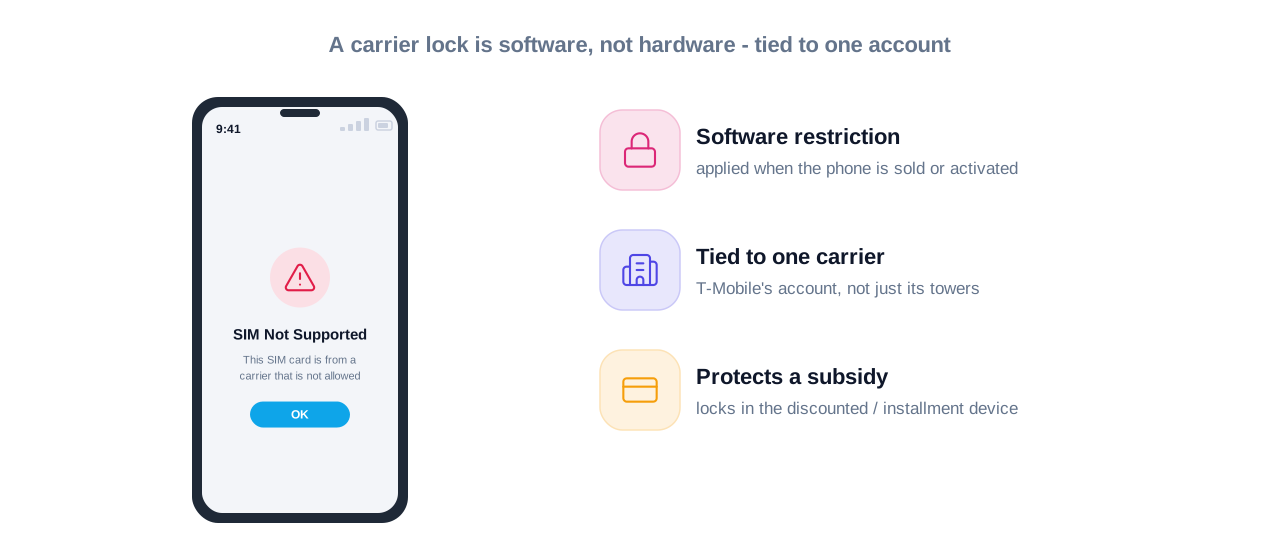
A network locked phone — also called a carrier locked phone — is a device that’s been programmed at the software level to only accept SIM cards from one specific carrier. This isn’t a hardware limitation. It’s a deliberate software restriction applied when the phone is first activated or sold.
T-Mobile locks phones for a straightforward business reason: they sell subsidized and installment-plan devices at a loss or at reduced upfront cost, betting on monthly plan revenue to recover that margin. Locking the device to their network protects that investment and keeps you from immediately taking a discounted phone to a competitor.
This matters for MVNO users because MVNOs — Mobile Virtual Network Operators — are companies that lease T-Mobile’s network infrastructure without owning it themselves. Even though your Mint Mobile, Consumer Cellular, or Visible plan technically runs on T-Mobile towers, a phone that’s locked to T-Mobile’s postpaid network may still reject an MVNO SIM. The lock isn’t about the underlying network; it’s about the specific carrier account the phone was originally tied to.
T-Mobile’s Current Unlock Policy in 2026: What’s Actually Changed
T-Mobile has updated its unlocking rules several times over the past few years, and the current policy as of 2026 is more nuanced than most people realize.
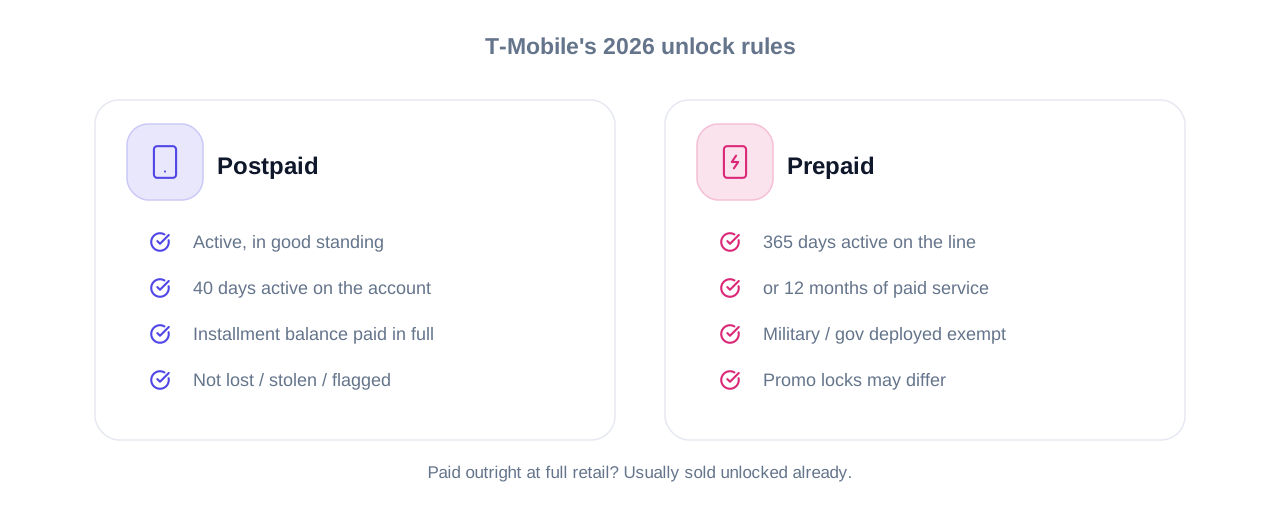
Postpaid Device Unlock Requirements
For phones purchased on a T-Mobile postpaid plan, the device must meet all of the following conditions before T-Mobile will process an unlock:
- The account must be active and in good standing (no overdue balances)
- The phone must have been active on the T-Mobile account for at least 40 days
- If the device is on an installment payment plan (like Equipment Installment Plan or EIP), the full balance must be paid off before unlock is approved
- The phone must not be reported as lost, stolen, or involved in fraudulent activity
This last point catches a lot of second-hand buyers off guard. If you purchased a used T-Mobile phone and the previous owner still has an outstanding balance or the device was flagged, you may be denied an unlock regardless of how long you’ve had it.
Prepaid Device Unlock Requirements
T-Mobile prepaid phones follow a slightly different schedule:
- The device must have been active on the T-Mobile prepaid account for at least 365 days — a full year
- Alternatively, the account can be unlocked after 12 months of paid service even if it’s not consecutive
- Military personnel and verified government-deployed customers are exempt from the waiting period and can request an unlock at any time
If you bought a T-Mobile prepaid phone and immediately tried to pop in a different SIM, that’s why it failed. The one-year rule is strictly enforced.
T-Mobile Branded Phones vs. Unlocked Phones
One distinction that confuses a lot of buyers: not every phone sold by T-Mobile is carrier locked. Phones purchased outright at full retail price are generally sold unlocked or eligible for immediate unlock. The restrictions primarily apply to subsidised or installment-plan devices, and to prepaid phones tied to specific promotional offers.
T-Mobile MVNO Compatibility: Why Your SIM Might Still Not Work
Here’s where things get genuinely confusing. You’ve confirmed your phone is supposed to work on T-Mobile’s network. Your MVNO uses T-Mobile’s towers. But the SIM still won’t activate. What’s going on?
The Difference Between Network Compatibility and Carrier Lock
These are two separate issues that people frequently conflate.
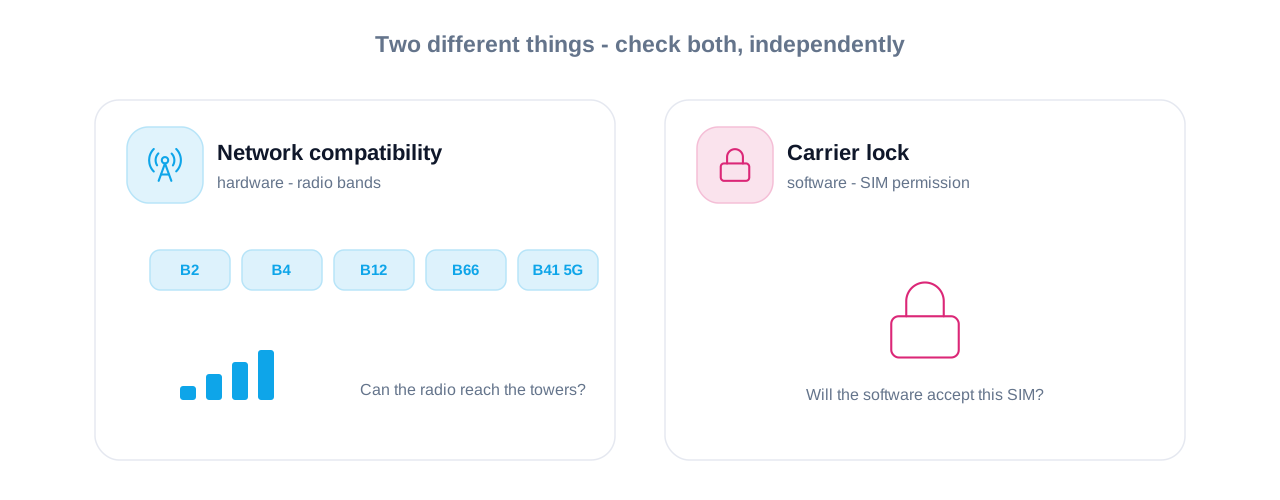
Network compatibility refers to whether your phone’s hardware — its cellular radio bands — can physically connect to the carrier’s towers. T-Mobile uses specific frequency bands including Band 2, Band 4, Band 12, Band 66, and the 5G mid-band at Band 41. If your phone doesn’t support those bands, it won’t connect well regardless of whether it’s locked or unlocked.
Carrier lock is a software restriction that prevents the phone from recognizing or activating a non-approved SIM card, even if the hardware is perfectly compatible.
An unlocked phone can still have network compatibility issues. A carrier-compatible phone can still be locked. You need to verify both independently.
Why MVNO SIMs Fail on Unlocked Phones
Even on a legitimately unlocked T-Mobile device, MVNO SIM not working errors can occur for a few specific reasons:
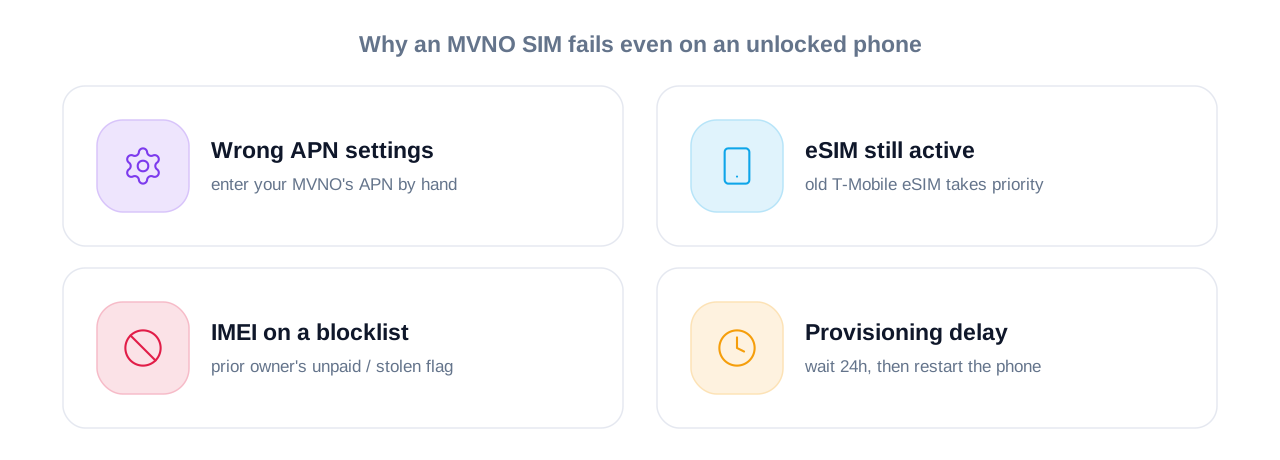
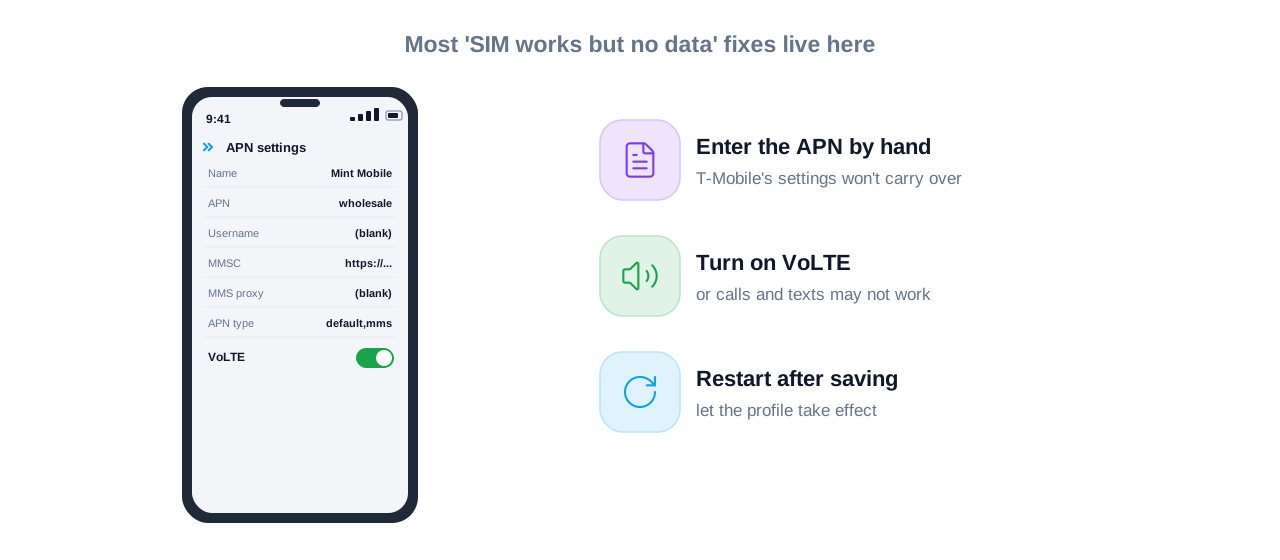
APN settings are wrong. Every MVNO has its own Access Point Name settings that tell the phone how to connect to data. T-Mobile’s default APN settings won’t automatically transfer to an MVNO SIM. You’ll need to manually enter your MVNO’s APN configuration. This is usually available on your MVNO’s support page or welcome email.
eSIM conflicts. Some T-Mobile devices have an embedded eSIM that remains active and takes network priority even after a physical SIM is inserted. If the eSIM profile hasn’t been properly removed or disabled, it can block the MVNO SIM from activating. You may need to contact T-Mobile or your MVNO to have the eSIM profile wiped before the physical SIM works.
IMEI blocklists. Your phone’s IMEI number is its unique hardware identifier. If the previous owner of your device defaulted on payments or reported the phone stolen, its IMEI could be on an industry-wide blocklist. You can check IMEI status through services like the GSMA’s Device Check or your MVNO’s activation portal.
Provisioning delays. Sometimes the unlock has been approved by T-Mobile but the SIM provisioning on the MVNO’s side hasn’t caught up. Waiting 24 hours and restarting the device fresh often resolves this.
How to Unlock a Carrier Locked Phone on T-Mobile: Step by Step
If your phone meets T-Mobile’s unlock eligibility requirements, the actual unlock process is relatively straightforward.
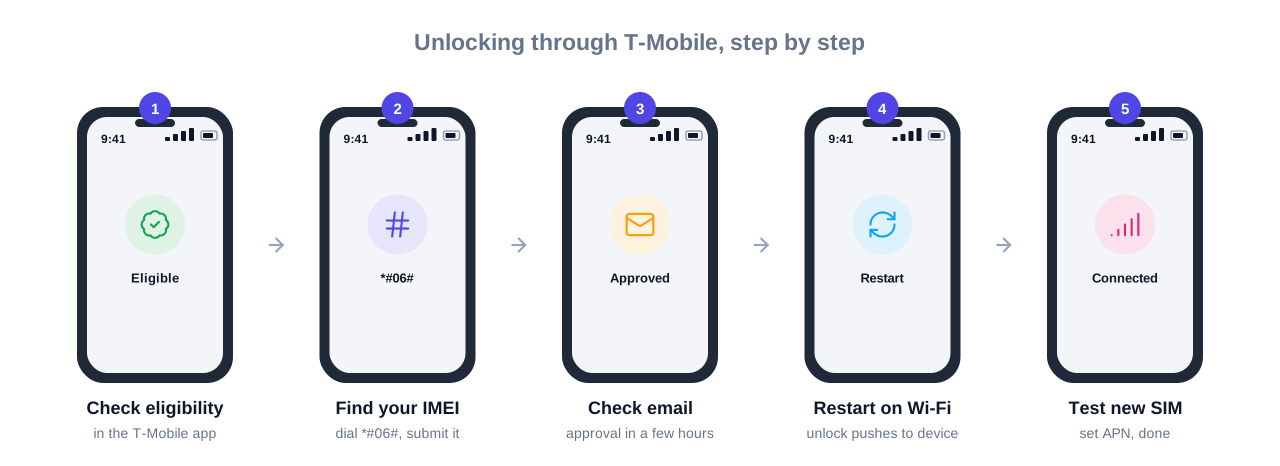
Method 1: Unlock Through T-Mobile Directly
- Verify eligibility first. Log into your T-Mobile account online or through the T-Mobile app and navigate to the device unlock section. The system will tell you immediately whether your device qualifies.
- Submit the unlock request online. Go to T-Mobile’s official device unlock page and enter your IMEI number (found by dialing *#06# on your phone). Select your device and submit the request.
- Check your email. T-Mobile will send a confirmation email, typically within a few hours for postpaid accounts. Prepaid unlocks can take up to two business days.
- Complete the unlock. For most modern Android phones, once T-Mobile pushes the unlock remotely, restarting the device while connected to Wi-Fi is enough. iPhones are typically unlocked through Apple’s servers automatically once T-Mobile processes the request.
- Test with a new SIM. Insert your MVNO SIM, let the phone search for a network, and configure APN settings as needed.
Method 2: Call T-Mobile Customer Support
If the online portal won’t process your request — which happens fairly often with older devices or complicated account situations — calling T-Mobile directly at 1-800-937-8997 usually resolves it faster. Have your IMEI number, account PIN, and device purchase details ready.
Method 3: Device Unlock App (Android Only)
Some T-Mobile Android phones have a built-in Device Unlock app pre-installed in the app drawer. When your device is eligible, this app will show an “Unlock” option. This is the most seamless method when it works, but not all T-Mobile phones include this app.
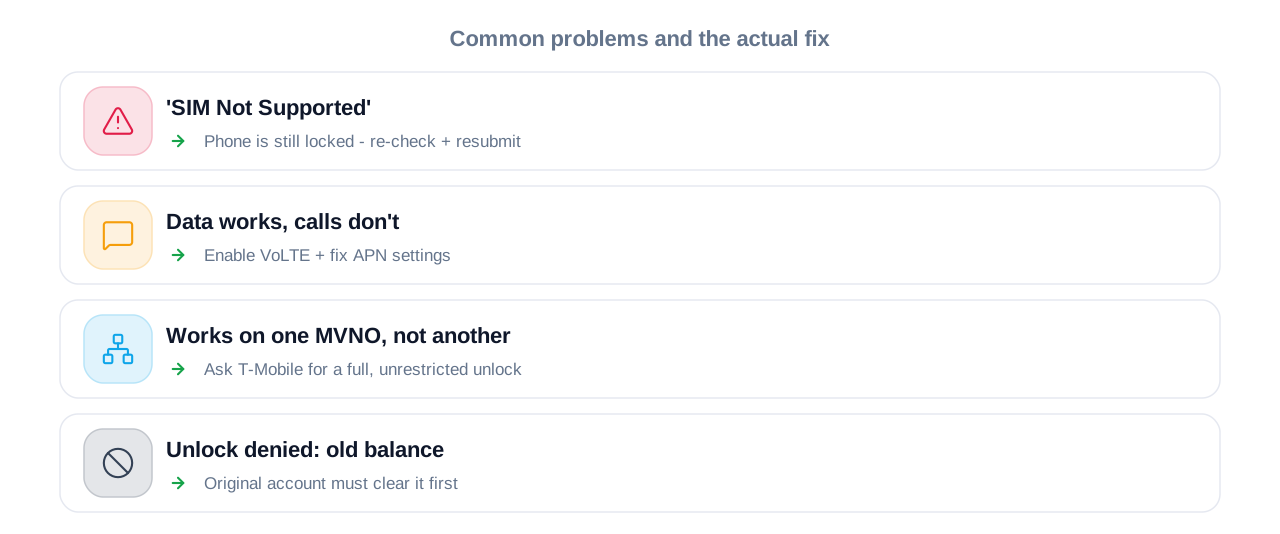
Common T-Mobile MVNO Problems and How to Fix Them
Phone Shows “SIM Not Supported”
This almost always means the device is still carrier locked. Double-check unlock eligibility and re-submit the unlock request if needed. If the unlock was supposedly completed, try restarting the phone after inserting the new SIM, or perform a network settings reset.
Data Works But Calls or Texts Don’t
This points to an APN or VoLTE (Voice over LTE) configuration issue rather than a lock problem. Many MVNOs require VoLTE to be manually enabled in the phone’s settings. Check your phone’s mobile network settings and ensure VoLTE is toggled on, then verify the MVNO-specific APN settings are entered correctly.
Phone Works with One MVNO but Not Another
This occasionally happens when a phone’s unlock is limited to specific networks or MVNOs, which can occur with certain promotional devices. In practice it’s rare, but if you’re experiencing it, the only reliable fix is to confirm the unlock status with T-Mobile directly and request a full, unrestricted carrier unlock.
Can’t Get Unlock Approved Because of Old Account Balance
If there’s an outstanding balance on the original T-Mobile account, the phone stays locked until that balance is cleared — even if you’re not the person who owes it. For second-hand buyers, this is genuinely a dead end without cooperation from the original account holder. In this situation, third-party unlocking services exist, though their legality and reliability vary. The safer path is to verify a phone’s unlock status and IMEI cleanliness before purchasing it used.
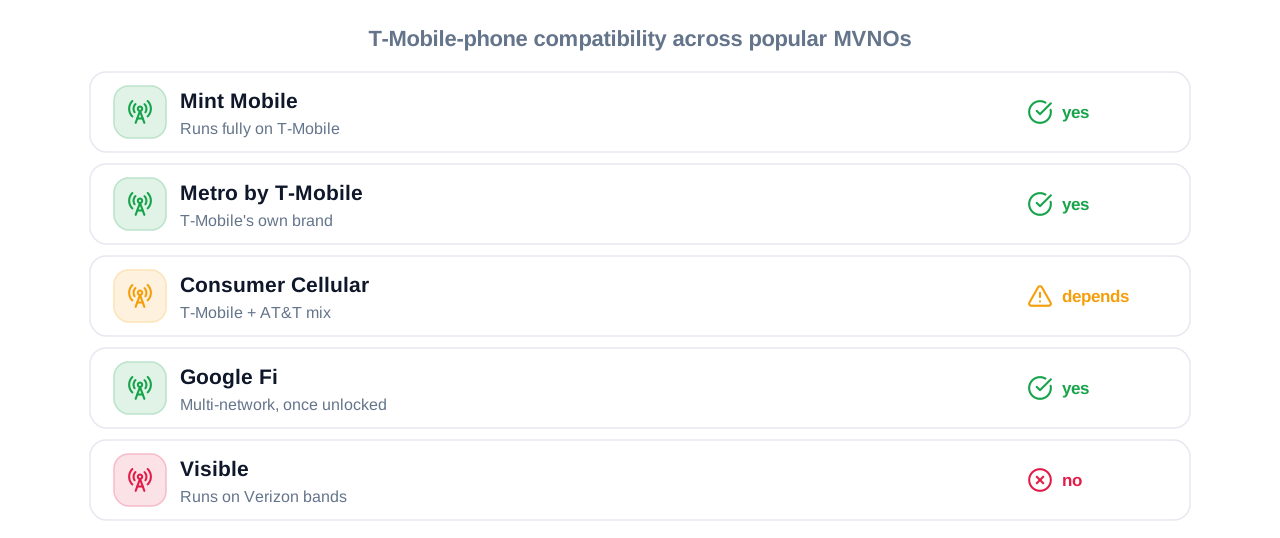
MVNOs That Run on T-Mobile’s Network: What to Know Before You Switch
If you’re choosing an MVNO specifically to use with a T-Mobile unlocked device, here’s a quick overview of the major players and what to know about each from a compatibility standpoint.
Mint Mobile runs entirely on T-Mobile’s network and generally offers excellent compatibility with unlocked T-Mobile devices. APN setup is required but well-documented.
Metro by T-Mobile is T-Mobile’s own prepaid brand, so compatibility is nearly universal. However, Metro-branded phones carry their own carrier locks and are subject to Metro’s separate unlock policy.
Consumer Cellular uses both T-Mobile and AT&T networks. Which network your phone lands on depends on your location and the device. This makes compatibility slightly less predictable with T-Mobile-specific devices.
Visible uses Verizon’s network and is incompatible with T-Mobile devices unless the device is a genuine unlocked model that supports Verizon’s bands — not something most T-Mobile branded phones do.
Google Fi uses T-Mobile, AT&T, and US Cellular, and requires phones to specifically support Fi’s network switching. Most standard T-Mobile devices work fine on Fi once unlocked.
Not necessarily. “Unlocked” means the carrier software restriction has been removed, but it doesn’t guarantee compatibility with every network. Your phone’s hardware needs to support the frequency bands of the carrier you’re switching to. T-Mobile devices generally work well with most T-Mobile-based MVNOs and some AT&T MVNOs, but often struggle on Verizon or Sprint-legacy networks due to band differences.
Postpaid unlock requests are typically processed within a few hours and rarely take more than one business day. Prepaid unlock requests can take up to two business days. You’ll receive a confirmation email once the unlock is complete.
Yes, in certain circumstances. If the device is flagged as lost or stolen, if the IMEI is on a blocklist, or if there are unresolved account issues, T-Mobile can decline the request. Military customers deployed overseas can bypass most eligibility requirements — T-Mobile’s military unlock policy is notably more flexible than standard procedures.
The most common cause is incorrect APN settings. After inserting your MVNO SIM, manually enter the APN details provided by your MVNO. If that doesn’t help, check whether the eSIM profile from T-Mobile is still active on the device, and whether VoLTE needs to be enabled in your network settings.
Yes. Under the Unlocking Consumer Choice and Wireless Competition Act passed in 2014, carriers are legally required to unlock devices upon request when the device meets their eligibility criteria. You have a legal right to request an unlock once your device qualifies.
Conclusion: Don’t Let Carrier Locks Slow You Down
T-Mobile’s carrier locking policies are designed to protect their business interests, and in many cases they’re completely reasonable. But they create real friction for people who’ve legitimately paid off their devices, purchased phones second-hand, or simply want the freedom to choose the MVNO plan that suits them best.
The key things to keep in mind: confirm unlock eligibility before switching, verify APN settings after inserting your new MVNO SIM, and check IMEI status when buying used. Most of the issues people run into have straightforward fixes once you know where to look.
[If your phone is finally up and running, it might also be the perfect time to look into organizing your device by following our guide on decluttering your digital files for good.]
If you’re still running into problems after working through the steps in this guide, the most reliable next move is calling T-Mobile directly with your IMEI and account information in hand. Their unlocking team handles these requests daily and can usually resolve edge cases that the online portal won’t touch.
Ready to find the right MVNO for your unlocked T-Mobile device? Check out our full comparison of the best T-Mobile-compatible MVNOs in 2026, including plan pricing, data speeds, and coverage maps.