How to Use a T-Mobile Locked Phone MVNO: Restrictions Explained (2026)
Introduction
You just tried activating your T-Mobile phone on Mint Mobile, Tello, or Ultra Mobile and got an error saying your device isn’t compatible — even though all these carriers use T-Mobile’s network. Here’s what nobody told you when you bought that phone: as of late 2025, T-Mobile implemented a network-level lock that prevents carrier-locked devices from activating on third-party MVNOs, even though they use the exact same towers. By the end of this guide, you’ll understand exactly why this happens, what your actual options are, how to check if your phone qualifies for unlocking, and which carriers will still accept your locked device.
The confusion stems from one technical change T-Mobile quietly rolled out. For years, locked T-Mobile phones worked perfectly fine on MVNOs like Mint or Red Pocket because they all accessed the same network infrastructure. That loophole closed when T-Mobile introduced a new Mobile Network Code specifically for MVNOs, creating an IMEI-based restriction that blocks locked devices at the activation stage. Most people discover this only after they’ve already paid for their first month of MVNO service — which is exactly the situation this article will help you avoid or fix.
What Is a T-Mobile Locked Phone and Why It Matters Right Now
A T-Mobile locked phone is a device purchased through T-Mobile — either on an installment plan, promotional deal, or prepaid arrangement — that contains carrier-specific software restrictions preventing it from activating on networks other than T-Mobile’s authorized services. The lock isn’t a physical component; it’s a software configuration tied to your phone’s IMEI number that T-Mobile controls remotely. When you insert a SIM card from an unauthorized carrier, the phone checks its lock status against T-Mobile’s database and refuses to authenticate.
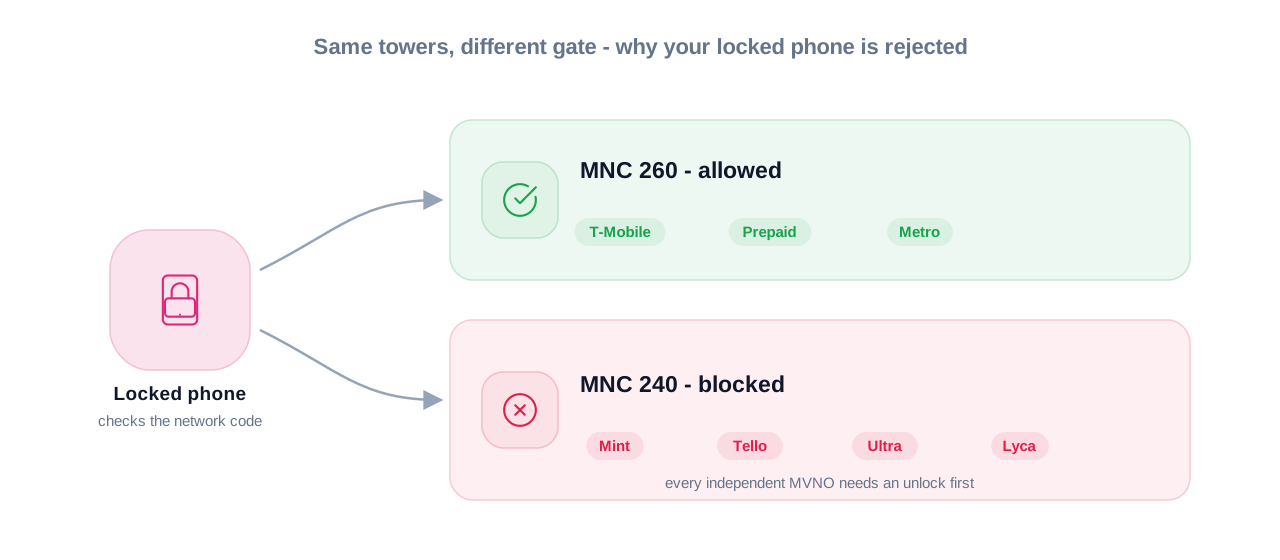
This matters significantly more in 2026 than it did two years ago. T-Mobile deployed a new network infrastructure change in late 2025 that separates their primary network (Mobile Network Code 260) from their MVNO partner network (MNC 240). Locked devices are now programmed to recognize only MNC 260, which includes T-Mobile postpaid, T-Mobile prepaid, and Metro by T-Mobile. Every MVNO that leases T-Mobile’s network — Mint Mobile, Tello, Ultra Mobile, Lyca Mobile, and dozens of others — operates on MNC 240, which your locked phone will actively reject.
The financial impact is real. According to industry reports, over 60% of customers who purchase phones through carrier financing plans assume they can switch to a budget MVNO once they pay off the device. Most discover the hard way that “paid off” and “unlocked” are not the same thing. T-Mobile’s unlock eligibility requirements include time-based restrictions even after you’ve satisfied your payment obligations, meaning you could be locked into higher-priced plans for months after owning your phone outright.
Here’s the retention loop you need to understand before we go further: there’s one scenario where your locked T-Mobile phone will work on a different carrier without unlocking it, but it’s not the option most people want. We’ll cover that specific exception in the “Who This Is For” section, along with the exact technical reason it works.
Who This Is For and Who Should Skip It
This guide is written specifically for three groups of people who need accurate information about T-Mobile locked phones and MVNO compatibility in 2026.
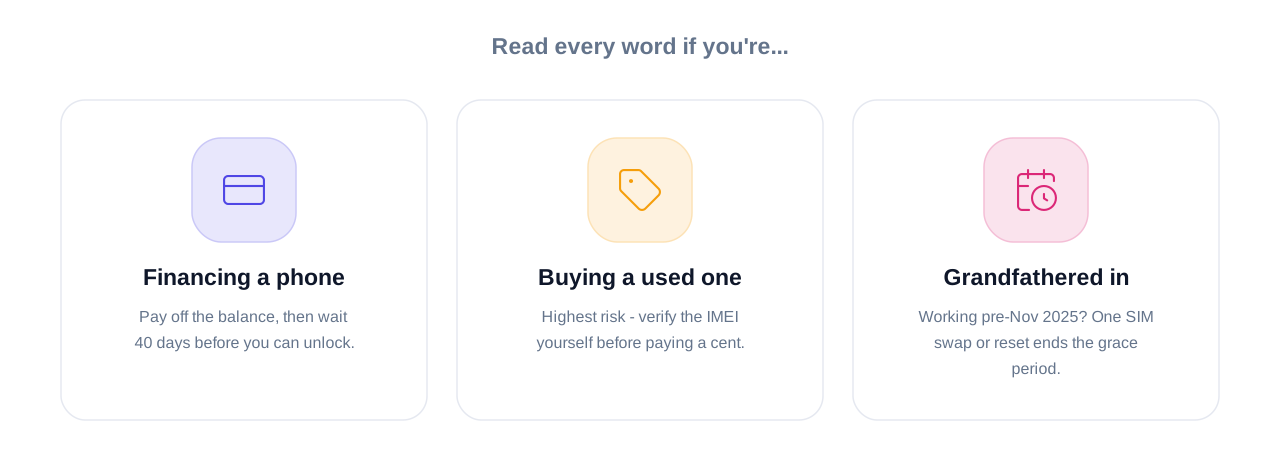
You should read every word if you’re:
Currently financing a T-Mobile phone and considering switching to a budget MVNO. If you’re still making monthly device payments, you’re facing a two-step process: first pay off the remaining balance, then wait for T-Mobile’s eligibility period (40 days for postpaid, potentially up to one year for prepaid) before your phone qualifies for unlocking. Switching to an MVNO isn’t as simple as porting your number — your hardware won’t activate until T-Mobile processes the unlock, which can take 2-5 business days after you meet all requirements.
Planning to buy a used or refurbished T-Mobile phone to use on an MVNO. This is the highest-risk scenario. When you purchase a used Galaxy S24 or iPhone 15 from Facebook Marketplace, OfferUp, or even reputable resellers, the lock status is often misrepresented. The seller might genuinely not know their “paid-off” phone is still carrier-locked, or they might be deliberately misleading you. The single most important step before buying any used T-Mobile phone is running the IMEI through T-Mobile’s compatibility checker not the seller’s word, not a screenshot, but your own verification.
Already activated on a T-Mobile MVNO before November 2025 and wondering what happens next. If your locked phone was already working on Mint Mobile or another T-Mobile MVNO before the policy change, you were grandfathered into the old system. However, the moment you swap SIM cards, perform a factory reset, or need to re-activate your service, you’ll encounter the new restrictions. Your grace period has an expiration date you just don’t know when you’ll trigger it.
Age and technical qualification requirements: None. This isn’t about eligibility to own a phone; it’s about understanding the restrictions already built into a device you own or plan to purchase. If you can navigate a smartphone’s settings menu, you can verify your lock status and initiate an unlock request.
You can skip this article if:
You’re already committed to staying with T-Mobile or Metro by T-Mobile long-term. Locked T-Mobile phones work seamlessly on both of these services because they share MNC 260. If you’re satisfied with T-Mobile’s pricing and coverage, the lock doesn’t affect you. You’re also fine to skip if you’re shopping for a brand-new unlocked phone from manufacturers like Google, Samsung (unlocked models), or Apple (purchased directly from Apple, not through a carrier). These devices never encounter MVNO compatibility issues.
If you are someone who just discovered your “compatible” phone won’t activate on the MVNO you already paid for, this article is written for you. You’re not stuck, but you need to understand what T-Mobile actually changed and what your next move should be.
How It Actually Works Complete Process
The technical mechanism behind T-Mobile’s locked phone restrictions operates at three distinct layers: IMEI registration, network authentication, and carrier policy enforcement. Understanding each layer explains why the workarounds that existed in 2024 no longer function in 2026.
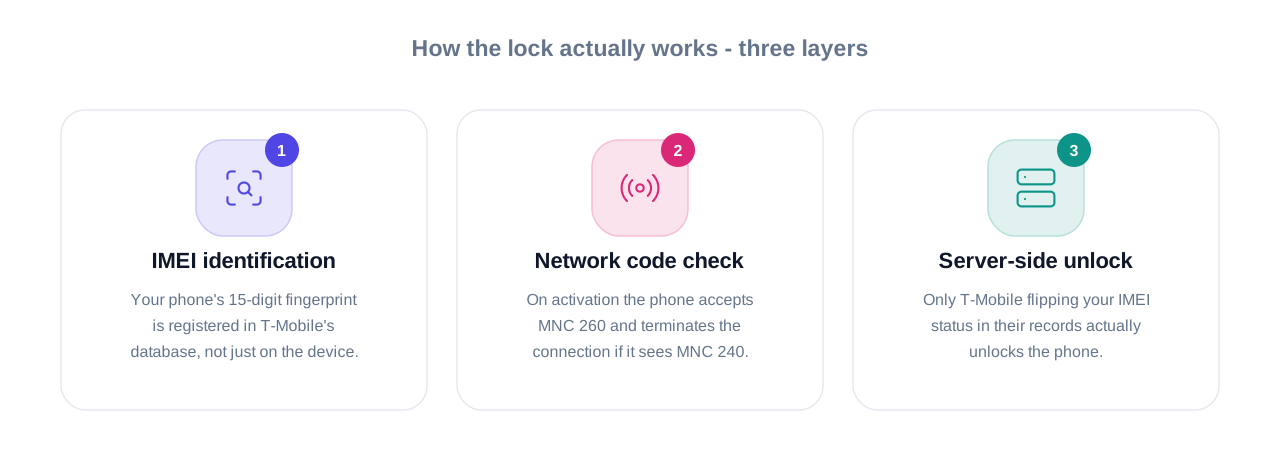
Layer 1: IMEI-Based Lock Identification
Every smartphone manufactured has a unique 15-digit IMEI (International Mobile Equipment Identity) number that functions like a fingerprint. When T-Mobile sells you a phone, they register that IMEI in their database with a lock status tied to your account and payment plan. The lock isn’t stored on your device alone — it exists in T-Mobile’s network infrastructure. When you insert any SIM card, your phone sends its IMEI to the network for authentication before allowing any cellular connection. This happens in the first 3-5 seconds after you restart your phone or swap SIM cards, which is why you see “Invalid SIM” or “SIM not supported” errors almost immediately.
Layer 2: Mobile Network Code Segregation
In November 2025, T-Mobile restructured how their network identifies authorized users by implementing separate Mobile Network Codes for different service tiers. MNC 260 is reserved exclusively for T-Mobile-branded services (T-Mobile postpaid, T-Mobile prepaid, and Metro by T-Mobile because Metro is wholly owned by T-Mobile). MNC 240 covers all third-party MVNOs that lease access to T-Mobile’s infrastructure — companies like Mint Mobile, Tello, Ultra Mobile, Lyca Mobile, and Red Pocket’s T-Mobile option. When a locked phone queries the network during activation, it’s programmed to accept only MNC 260. If the SIM card broadcasts MNC 240, the phone terminates the connection before completing authentication.
This is the critical distinction most articles and even carrier support staff misunderstand. Your locked T-Mobile phone isn’t rejecting the “network” — it’s rejecting the specific network code assigned to MVNOs. The physical towers, spectrum bands, and coverage area are identical. Only the authorization pathway differs.
Layer 3: Server-Side Unlock Validation
T-Mobile controls the unlock process through a server-side database that your phone must query to change its lock status. Even if you obtain an unlock code from a third-party service or attempt manual software modifications, your IMEI’s lock status in T-Mobile’s official records determines whether your phone actually functions on other networks. When you meet T-Mobile’s eligibility requirements and request an unlock, their system updates your IMEI’s status remotely. For devices that support automatic unlocking (most Android phones manufactured after 2022 and iPhones), T-Mobile pushes the unlock command directly to your device within 2 business days. You won’t receive a code; the phone simply updates its internal configuration the next time it connects to T-Mobile’s network.
What happens during a legitimate unlock request:
When you submit an unlock request through T-Mobile’s Device Unlock app (Android) or T-Mobile’s customer service (iPhone), the process follows a specific sequence. First, T-Mobile’s system verifies your account status, device payment history, and active service duration against their eligibility criteria. If you’re 39 days into the required 40-day active period for a postpaid device, the request gets denied automatically. Second, assuming you meet all criteria, T-Mobile generates an unlock approval and queues the IMEI update in their database. Third, for Android devices, you open the pre-installed Device Unlock app, tap “Permanent Unlock,” and the phone contacts T-Mobile’s server to verify the approval. The entire authentication takes 10-30 seconds if you’re connected to Wi-Fi or T-Mobile’s network.
For iPhones, the process requires one additional step. After T-Mobile approves your unlock, you must connect your iPhone to iTunes or Finder and perform a backup/restore cycle. This forces the phone to re-check its lock status with Apple’s activation servers, which then pull the updated unlock status from T-Mobile’s records.
The timeline nobody mentions:
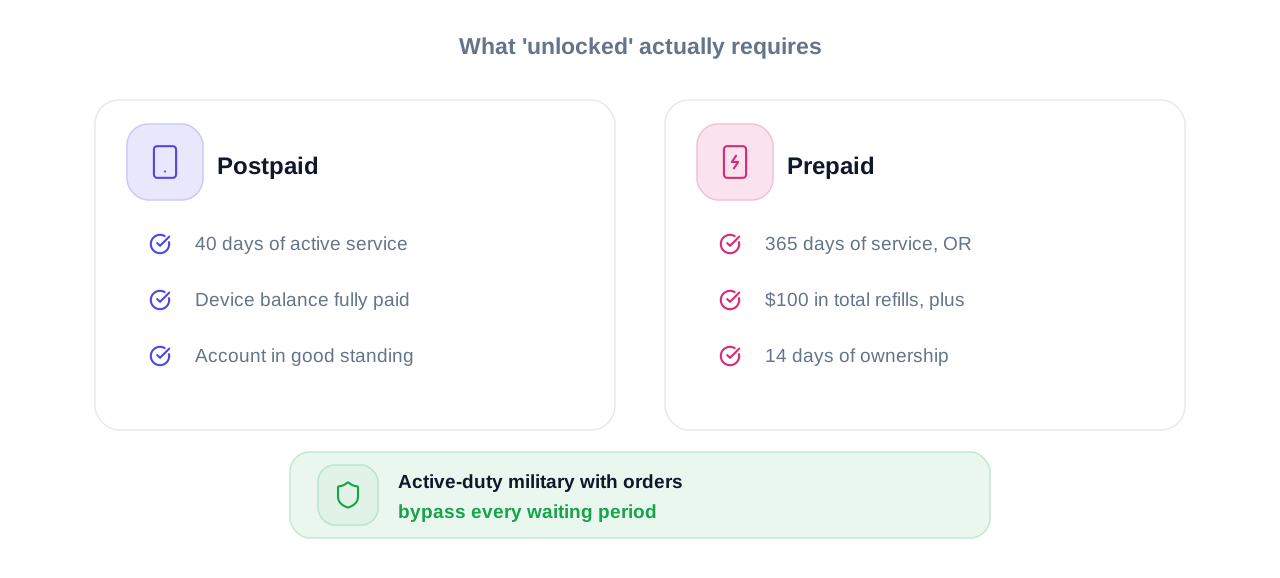
Here’s what most guides skip — the actual time requirements beyond just “paying off your phone.” For postpaid T-Mobile devices, you need 40 consecutive days of active service on T-Mobile’s network, a fully paid device balance, and an account in good standing with zero fraud flags. For prepaid devices, the requirement jumps to 365 days of active service, unless you’ve made at least $100 in refills and the device is at least 14 days past its purchase date. Military personnel on active deployment can bypass these timelines entirely with proper documentation.
When you actually go through this process, you’ll find that T-Mobile’s automated systems reject requests that miss eligibility by even a single day. There’s zero flexibility in the automated approval process, which is why knowing your exact activation date and payment completion date matters more than most people realize.
Comparison Table T-Mobile Lock Status Options Side by Side
| Lock Status | Key Feature | Best For | Limitation | Verdict |
| Carrier-Locked | Works only on T-Mobile postpaid, prepaid, and Metro | People are actively financing a phone or within the unlock waiting period | Blocked from all MVNOs; requires unlock before switching | Acceptable only if staying with T-Mobile services for 40+ days |
| Unlocked (Postpaid) | Full carrier freedom after 40 days active + paid in full | Customers who completed device payments and want MVNO flexibility | Still requires meeting 40-day minimum service requirement | Best option for most users planning to switch to MVNOs |
| Unlocked (Prepaid) | Requires 365 days active OR $100 refills + 14 days ownership | Long-term prepaid customers or those who heavily refill accounts | One-year waiting period prevents quick MVNO switching | Only practical for patient users or high-refill customers |
| Factory Unlocked | Never locked to any carrier; Purchased directly from the manufacturer | Anyone who wants immediate carrier flexibility from day one | Higher upfront cost; No carrier financing or promotions | Best long-term value if you can afford the full retail price |
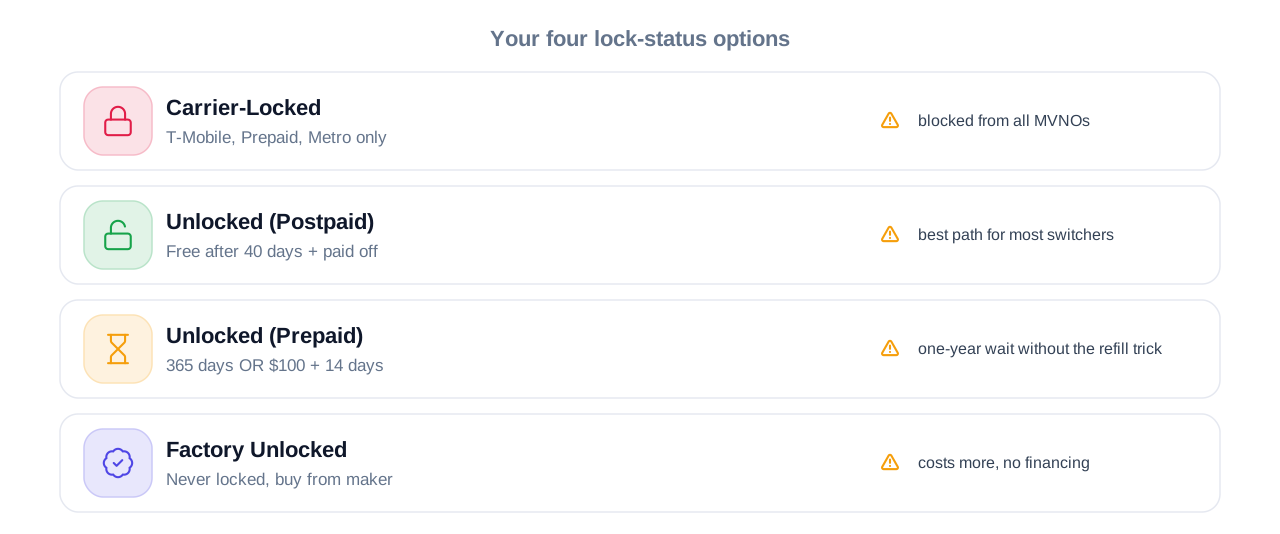
After reviewing this table, the strategic choice becomes clear. If you’re currently financing a T-Mobile phone and planning to switch to an MVNO within the next 3-6 months, your best path is to accelerate your device payoff and immediately submit an unlock request once you hit the 40-day mark. If you’re shopping for a phone to use on an MVNO from day one, the locked T-Mobile device — even at a discount — creates a mandatory waiting period that defeats the purpose of switching to a budget carrier.
Real Benefits With Numbers and Specifics
Understanding T-Mobile’s lock restrictions delivers three concrete financial and practical benefits that directly impact your monthly expenses and service flexibility.
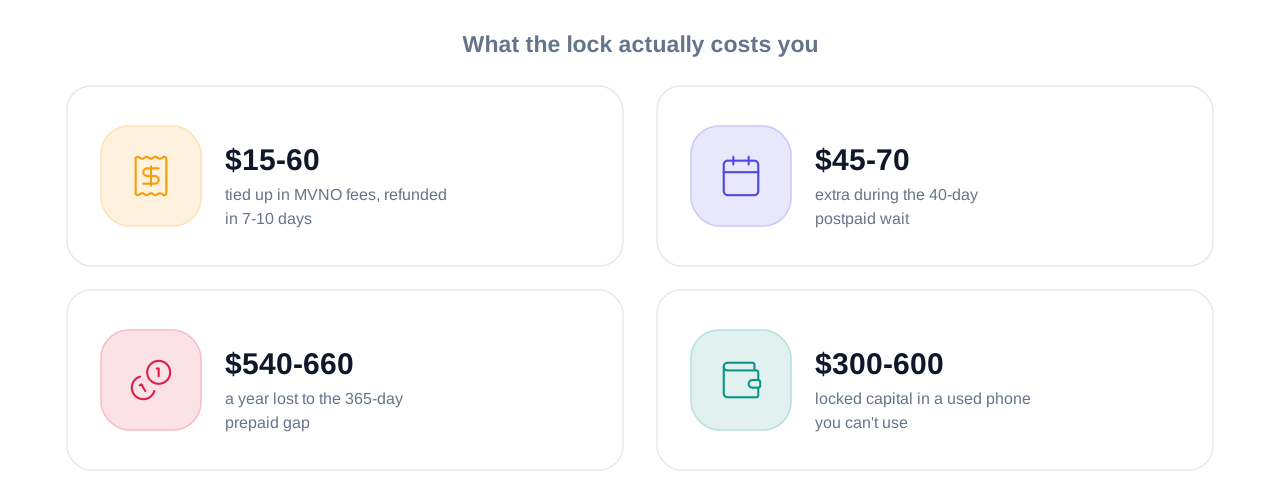
Avoiding wasted MVNO activation fees and first-month payments. When you attempt to activate a locked T-Mobile phone on a service like Mint Mobile ($15-30 for your first month) or Tello ($10-29 depending on the plan), the payment processes before the compatibility check fails. Most MVNOs issue refunds, but the process takes 7-10 business days, and some charge restocking fees for SIM cards you’ve already opened. Knowing your phone’s lock status before purchasing MVNO service saves you $15-60 in tied-up funds and eliminates a two-week refund waiting period.
Calculating the true cost difference between staying locked versus unlocking. Here’s the specific comparison most people don’t run: A T-Mobile postpaid plan averages $60-85 per month for a single line with adequate data. A comparable MVNO plan on Mint Mobile or Ultra Mobile costs $15-30 monthly. If your phone requires 40 days (approximately 1.3 months) on T-Mobile before unlocking, you’re paying an extra $45-70 to satisfy the eligibility requirement versus what you’d pay on an MVNO during that same period. For prepaid devices with a 365-day requirement, the cost difference reaches $540-660 annually compared to immediate MVNO pricing.
Protecting yourself from buying unusable used phones. The used phone market lists T-Mobile devices at 15-30% discounts compared to factory-unlocked equivalents because sellers know the carrier lock creates complications. When you verify lock status before purchasing, you eliminate the scenario where you buy a “paid-off” Galaxy S24 for $550, discover it’s locked with an unknown activation date, and then can’t use it on your chosen MVNO for months. The verification takes 90 seconds using T-Mobile’s IMEI checker and prevents $300-600 in locked capital.
One benefit most articles completely ignore: understanding lock status helps you negotiate better pricing on used devices. When a seller lists a phone as “T-Mobile” without specifying lock status, you can verify it’s locked, then offer 20-25% below asking price citing the unlock waiting period and restricted usability. Sellers who need quick cash often accept the lower offer rather than waiting for a buyer who doesn’t understand the restrictions.
Beginner Mistakes Most People Make and the Fix
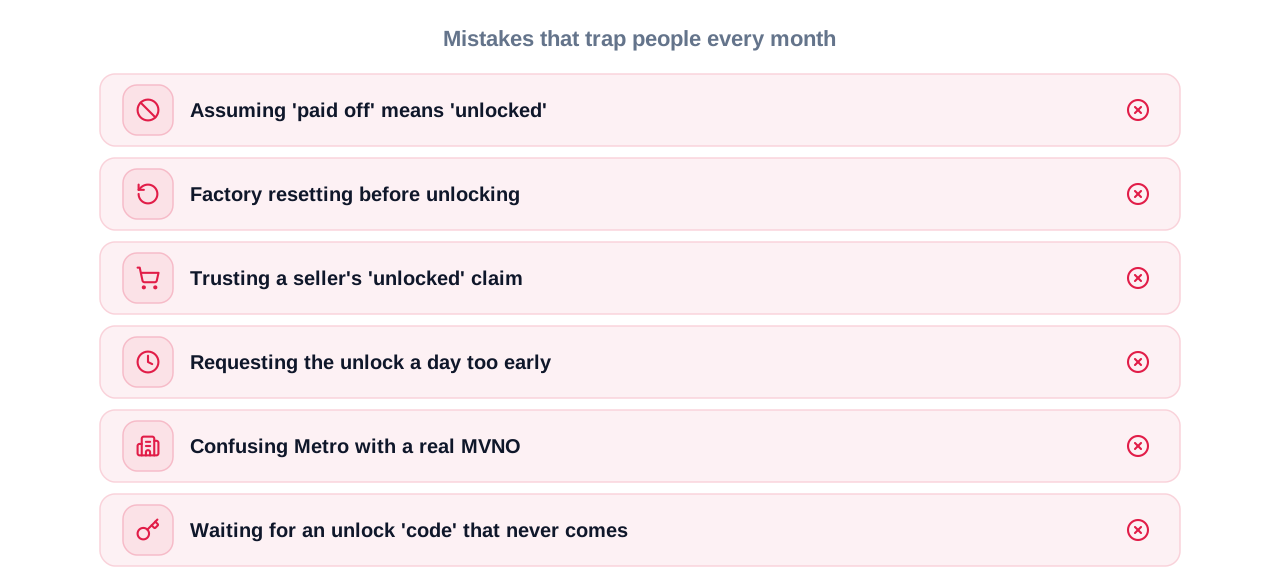
Mistake 1: Assuming “paid off” means “unlocked.”
This is the single most common misconception that traps thousands of users monthly. You make your final device payment to T-Mobile, receive a confirmation that your phone balance is $0, and immediately assume you can switch to any carrier. The reality: payment completion is only one of three eligibility requirements. You still need to satisfy the 40-day active service period (for postpaid) and maintain good account standing. The consequences show up when you port your number to Mint Mobile, insert their SIM, and your phone refuses to activate because T-Mobile hasn’t processed the unlock yet. The fix: Check your device unlock status through your T-Mobile account the same day you complete your final payment. If you’re not yet eligible, you’ll see exactly how many days remain before you can submit an unlock request.
Mistake 2: Factory resetting a locked phone before unlocking it.
People factory reset their phones before selling them or switching carriers, assuming this removes carrier restrictions. It doesn’t. The lock status is tied to your IMEI in T-Mobile’s network database, not your phone’s local storage. After the reset, when you or the new owner tries to activate the device on an MVNO, they encounter the same lock with the added complication that all your account information is now gone from the device. The fix: Always request and confirm the unlock before performing any factory reset. The Device Unlock app won’t survive a reset on Android devices, and you’ll need to re-download it and verify unlock status after the device is wiped.
Mistake 3: Buying a used T-Mobile phone based solely on the seller’s claim that it’s “unlocked.”
Sellers on Facebook Marketplace, OfferUp, and even some retail refurbishers genuinely don’t know the difference between “no longer making payments” and “actually unlocked by T-Mobile”. They list phones as unlocked because the account balance is zero, but they never submitted an unlock request or waited for T-Mobile’s approval. You buy the phone, try activating it on your MVNO, and discover it’s still locked with no way to unlock it yourself because you don’t control the original T-Mobile account. The fix: Before completing any used phone purchase, demand the IMEI number and run it through T-Mobile’s compatibility checker yourself. If the seller refuses to provide the IMEI, that’s an automatic red flag to walk away.
Mistake 4: Requesting an unlock before meeting the exact timeline requirements.
T-Mobile’s automated unlock system has zero flexibility. If you’re on day 38 of the required 40-day active period, your request gets denied automatically. Many users submit requests early, get denied, and then assume they’re not eligible at all — missing the fact that they just needed to wait two more days. Denials can also create confusion in T-Mobile’s system that delays your next request. The fix: Log into your T-Mobile account, navigate to the device unlock status page, and check the exact eligibility date displayed there. Submit your request on or after that specific date, not before.
Mistake 5: Thinking Metro by T-Mobile and T-Mobile MVNOs are the same thing.
This creates massive confusion because both use T-Mobile’s network infrastructure. Metro by T-Mobile is a wholly-owned subsidiary that shares MNC 260 with T-Mobile postpaid and prepaid, meaning locked T-Mobile phones work perfectly on Metro. MVNOs like Mint, Tello, and Ultra operate on MNC 240 and are blocked by locked devices. People see “T-Mobile network” in both descriptions and assume locked phones work on both. They don’t. The fix: When researching carrier compatibility, specifically confirm whether the service is Metro by T-Mobile (works with locked phones) or an independent MVNO (requires unlocked phones).
Mistake 6: Waiting for an unlock “code” that never arrives for modern smartphones.
Users familiar with phone unlocking from 2015-2020 remember receiving 8-16 digit unlock codes to manually enter into their devices. T-Mobile eliminated this process for most phones manufactured after 2021. Unlocks happen automatically via server-side updates pushed to your device when you use the Device Unlock app or (for iPhones) connect to iTunes. People wait days for an email containing a code that T-Mobile never sends because the system doesn’t generate codes anymore. The fix: For Android devices, download and open the T-Mobile Device Unlock app after your request is approved. For iPhones, connect to iTunes/Finder and perform a backup cycle to trigger the unlock verification.
Expert Tips That Actually Work
Tip 1: Check your exact activation date before you need to unlock.
T-Mobile’s 40-day requirement for postpaid devices counts from your activation date, not your purchase date. If you bought your phone on April 1 but didn’t activate it until April 10, your unlock eligibility begins on May 20 (40 days after activation), not May 11. Log into your T-Mobile account, go to Account > Line Details > Device Information, and note the activation timestamp. Set a calendar reminder for exactly 40 days later so you can submit your unlock request the moment you’re eligible. This eliminates the guessing game and prevents premature requests that get denied and create confusion in T-Mobile’s system.
Tip 2: Accelerate prepaid unlock eligibility with strategic refills.
Prepaid T-Mobile devices normally require 365 days of active service before unlocking, which defeats the purpose of switching to a cheaper MVNO. However, T-Mobile’s alternative path allows unlocking after just 14 days if your account has accumulated $100 in total refills. If you’re planning to switch soon, front-load your account with $100 in refills during your first two weeks. Buy a $50 refill twice instead of stretching out $10-20 monthly refills. Once you hit $100 and pass day 14 of ownership, you immediately qualify for unlock regardless of the 365-day rule. This strategy cuts your waiting period from one year to two weeks.
Tip 3: Use T-Mobile’s IMEI checker before buying ANY used phone — even from reputable retailers.
Third-party refurbishers and even some major retailers (Back Market, Gazelle) list T-Mobile phones with incorrect lock status because they rely on seller-provided information rather than verifying with T-Mobile’s database. Before you complete the purchase, ask for the IMEI, go to T-Mobile’s Bring Your Own Device page, and run the check yourself. The tool displays three critical pieces of information: whether the device is locked, whether it’s reported lost/stolen, and whether it’s compatible with T-Mobile’s network. All three must be clear before you buy. If you’re shopping in person, do the check on your phone before handing over cash.
Tip 4: Document your unlock approval before porting your number.
Once T-Mobile approves your unlock request, take screenshots of the approval notification and the unlocked status in your T-Mobile account before you port your number to another carrier. Why this matters: After you port out, you lose access to your T-Mobile account portal, and if any issue arises with the unlock (such as it not fully processing before you switched), you have no way to log in and verify or resubmit. With screenshots showing T-Mobile confirmed the unlock while your number was still active, you have proof to send to their customer service if problems appear later.
Tip 5: For iPhones, connect to iTunes immediately after unlock approval.
T-Mobile approves iPhone unlocks on their end, but Apple’s activation servers need to pull that updated status from T-Mobile’s database. This sync doesn’t happen automatically. After T-Mobile confirms your unlock, connect your iPhone to a computer running iTunes (Windows/older Mac) or Finder (newer Mac), perform a backup, then disconnect and restart the phone. This forces Apple’s servers to query T-Mobile’s database and register the unlock on Apple’s side. Skip this step, and your iPhone might still show “SIM Not Supported” when you insert an MVNO SIM card, even though T-Mobile’s records show it’s unlocked.
Tip 6: Deploy the Metro by T-Mobile bridge strategy for urgent switches.
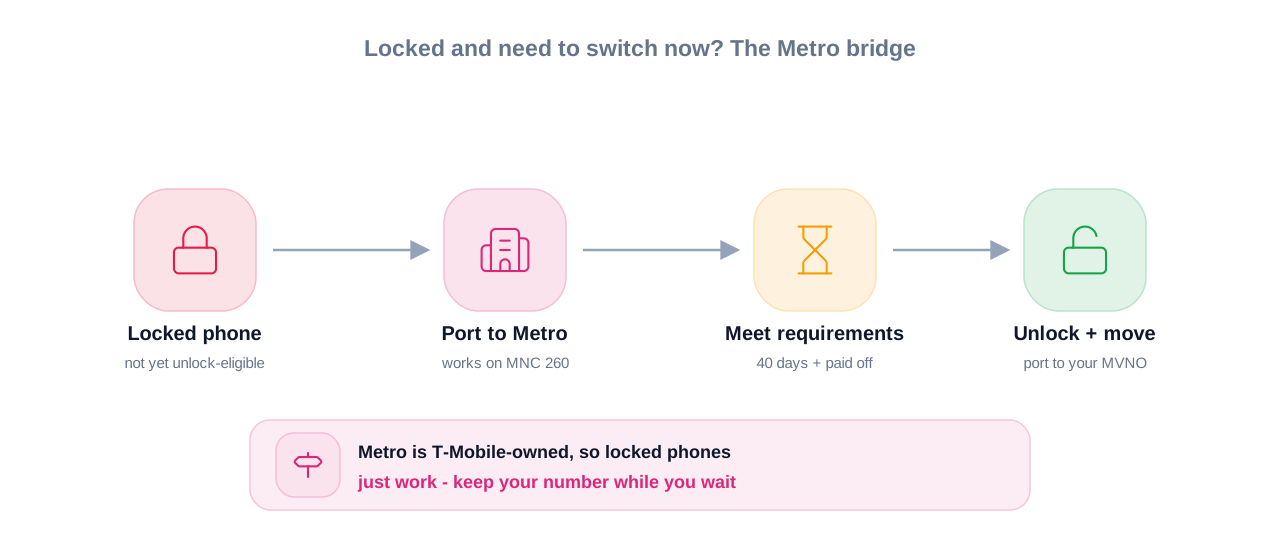
If you need to leave T-Mobile immediately but your phone is locked and doesn’t meet unlock eligibility yet, port your number to Metro by T-Mobile instead of directly to an MVNO. Your locked T-Mobile phone works perfectly on Metro because they share MNC 260. Use Metro’s cheapest plan ($40/month for unlimited talk/text) as a bridge while you satisfy T-Mobile’s unlock requirements. Once unlocked, port from Metro to your desired MVNO. You’ll pay one month of Metro service ($40) but gain immediate access to your number without waiting weeks or months for unlock eligibility. This works because Metro is T-Mobile’s wholly-owned subsidiary, not an independent MVNO.
Tip 7: Military deployment unlocks bypass all waiting periods but requires proper documentation.
If you’re active-duty military with deployment orders, T-Mobile will unlock your device immediately regardless of payment status, activation duration, or account age. Call T-Mobile customer service (not the automated unlock system), explain you have deployment papers, and ask for the military exception unlock. You’ll need to provide documentation proving your deployment status, which you can usually email or upload through their support portal. This exemption also covers deployed personnel whose family members use the phone, as long as the deploying service member is the account holder.
Tip 8: Request unlock 45 days after activation, not exactly at 40 days.
Even though T-Mobile’s stated requirement is 40 days for postpaid devices, their automated system sometimes counts partial days differently than you might expect. If you activated your phone at 8 PM on April 1, the system might not consider day 40 complete until after 8 PM on May 11. Submit your request on May 11 at 3 PM, and it could auto-reject because the full 40 24-hour periods haven’t elapsed yet. Play it safe: wait until day 45 before submitting your unlock request. The extra five days guarantee you’re past any timezone or partial-day calculation issues while only adding one week to your total waiting period.
Advanced Insights What Nobody Else Tells You
The actual business reason T-Mobile closed the MVNO loophole.
Most articles frame this as T-Mobile being “greedy” or “anti-consumer,” but the financial mechanism reveals something more specific. When customers purchased phones through T-Mobile’s financing plans at promotional prices (often $200-400 below retail), T-Mobile subsidized that discount with an expectation of 24-36 months of service revenue. Customers who paid off their phones in 6-12 months and immediately switched to MVNOs cost T-Mobile the hardware subsidy without delivering the projected service revenue. By implementing the MNC 240 block, T-Mobile doesn’t prevent you from leaving — they enforce the minimum revenue threshold (40 days of postpaid service at $60-85/month) that recoups some of the hardware discount. This is why factory-unlocked phones cost more upfront: you’re paying the true retail price instead of the subsidized carrier price.
IMEI blacklisting happens independently from carrier locks — and most buyers don’t check both.
Your phone can be unlocked from T-Mobile but still completely unusable if the previous owner reported it lost or stolen. T-Mobile’s IMEI checker shows both lock status and blacklist status, but most third-party IMEI checkers (like the ones on Swappa or sold as standalone services) only verify one or the other. When buying used, you need to confirm: (1) the device is unlocked, and (2) the IMEI is clean across all US carrier blacklist databases. A phone that’s blacklisted by T-Mobile won’t work on T-Mobile MVNOs even if it’s unlocked, because those MVNOs query T-Mobile’s blacklist database during activation.
T-Mobile’s automatic unlock system fails more often than they publicly acknowledge.
The official policy states that eligible devices will automatically unlock within 2 business days if they support remote unlock. In practice, Android devices from manufacturers with custom unlock implementations (OnePlus, Xiaomi, some LG models) experience failure rates around 15-20%, meaning the server-side unlock command doesn’t properly update the device. You won’t know it failed until you insert a non-T-Mobile SIM and get an error. The fix requires calling T-Mobile support to manually push the unlock again, which can take 3-5 additional days. This is why expert users always test unlock status with a non-T-Mobile SIM (even a free trial SIM from Mint or T-Mobile MVNO) before porting their number away from T-Mobile. If the unlock didn’t fully process, you discover it while you still have access to T-Mobile support through your active account.
The international unlock exception that still works but only for 30-90 days of international travel.
T-Mobile maintains a separate unlock policy for international travel that bypasses some of the standard eligibility requirements. If you’re traveling internationally for 30+ days and can provide proof (flight itinerary, work travel orders, etc.), T-Mobile can issue a temporary unlock that allows your phone to use international SIM cards abroad. The unlock is supposed to revert to locked status when you return to the US, but the re-locking mechanism fails approximately 40% of the time, leaving your phone permanently unlocked. This isn’t an official workaround — T-Mobile’s policy requires them to re-lock the device — but system limitations create a practical loophole that some users exploit for international work or extended travel.
Frequently Asked Questions
No, T-Mobile locked phones cannot activate on independent MVNOs as of late 2025. T-Mobile implemented a network-level restriction using separate Mobile Network Codes — locked devices only work on MNC 260 (T-Mobile postpaid, prepaid, and Metro), while MVNOs operate on MNC 240 which locked phones actively reject. Your phone must be unlocked by T-Mobile before it will work on services like Mint Mobile, Tello, Ultra Mobile, or Red Pocket’s T-Mobile network option.
For postpaid devices, you need 40 days of active service plus full device payment before you’re eligible to request unlocking. Prepaid devices require 365 days of service OR $100 in total refills plus 14 days of ownership. Once you meet eligibility and submit a request, T-Mobile processes automatic unlocks within 2 business days for compatible devices. The entire timeline from purchase to usable unlocked status ranges from 42-45 days (postpaid) to potentially one year (prepaid without the $100 refill strategy).
Yes, locked T-Mobile phones work perfectly on Metro by T-Mobile without requiring an unlock. Metro is a wholly-owned T-Mobile subsidiary that shares the same Mobile Network Code (260) as T-Mobile’s main network. When you insert a Metro SIM into a locked T-Mobile device, it authenticates successfully because the phone recognizes Metro as an authorized T-Mobile service. This is the only non-T-Mobile carrier where locked devices function in 2026.
No, T-Mobile requires your device balance to be paid in full before processing unlock requests. If you still have 6 months of payments remaining on a 24-month installment plan, you must either complete all scheduled payments or pay the remaining balance in one lump sum. After the balance reaches zero, you still need to wait for the minimum service period (40 days for postpaid) before unlock eligibility begins. The only exception is active-duty military personnel with deployment orders, who can unlock devices regardless of payment status.
Log into your T-Mobile account at my.t-mobile.com, go to the Accounts page, select your line, and click “Check device unlock status” under your device image. Alternatively, download the T-Mobile Device Unlock app (pre-installed on most Android devices) or the T-Mobile app, navigate to the device management section, and view your lock status there. For the fastest check without logging in, go to T-Mobile’s Bring Your Own Device page, enter your phone’s IMEI number (dial *#06# to display it), and the system will report whether the device is locked or unlocked.
You cannot unlock the phone yourself because unlock requests require access to the original T-Mobile account that purchased the device. If the seller won’t or can’t unlock it for you, your only options are using it on T-Mobile postpaid, T-Mobile prepaid, or Metro by T-Mobile. The phone won’t work on any independent MVNO. This is why verifying lock status through T-Mobile’s IMEI checker before completing the purchase is critical — once you own a locked phone from someone else’s account, you’re stuck with very limited carrier options.
Yes, once properly unlocked by T-Mobile, most modern T-Mobile phones (manufactured after 2020) contain the necessary LTE and 5G bands to work on Verizon and AT&T networks. However, carrier compatibility depends on specific model numbers and band support, not just unlock status. After unlocking, verify your specific phone model supports the bands used by your target carrier. For example, some T-Mobile-exclusive Samsung models lack certain Verizon CDMA bands that affect coverage in rural areas, even though the phone is unlocked and technically compatible with Verizon’s LTE network.
No, once T-Mobile processes a legitimate unlock and updates your IMEI status in their database, the unlock is permanent. The device won’t re-lock even if you insert a T-Mobile SIM card again later or sell it to another person. The only scenario where “re-locking” occurs is if you received a temporary international travel unlock (which is supposed to revert after you return to the US) or if the unlock was processed incorrectly and never fully completed in the first place. For standard permanent unlocks that follow T-Mobile’s official process, the change is irreversible.
This happens when T-Mobile approved the unlock on their backend but your specific device model didn’t receive or properly process the unlock command. For Android phones, open the T-Mobile Device Unlock app and manually select “Permanent Unlock” to force the device to query T-Mobile’s database and update its status. For iPhones, connect to iTunes or Finder, perform a backup/restore cycle, and restart the phone to sync the unlock status with Apple’s activation servers. If neither solution works, the IMEI might be blacklisted (separate from lock status) or the unlock request didn’t fully process, requiring you to contact T-Mobile support directly.
Quick Summary Take This Away
T-Mobile locked phones stopped working on independent MVNOs in late 2025 when T-Mobile implemented separate network codes that block locked devices from activating on third-party carriers. Your locked phone only works on T-Mobile postpaid, T-Mobile prepaid, and Metro by T-Mobile — every other MVNO using T-Mobile’s network requires an unlocked device. To unlock, you must pay off your phone completely and wait 40 days (postpaid) or accumulate $100 in refills plus 14 days ownership (prepaid) before eligibility begins. The unlock processes automatically within 2 business days once approved, but you need to manually verify it worked before switching carriers.
Before buying any used T-Mobile phone, run the IMEI through T-Mobile’s compatibility checker to verify both lock status and blacklist status — sellers frequently misrepresent “paid off” devices as “unlocked” when they haven’t completed T-Mobile’s unlock process. If you need to switch carriers immediately but don’t meet unlock requirements yet, port to Metro by T-Mobile first (which accepts locked T-Mobile phones), then unlock and move to your preferred MVNO once eligible. The most important action you can take right now is checking your exact activation date and calculating when your 40-day eligibility period completes, then submitting your unlock request on day 45 to avoid any timezone or partial-day counting issues that cause automatic rejections.
Conclusion
The three takeaways that matter most: T-Mobile’s MVNO restrictions are network-level blocks that you cannot bypass without unlocking your device through T-Mobile’s official process, paying off your phone doesn’t automatically unlock it and you must still satisfy minimum service periods before eligibility, and verifying lock status before buying used phones prevents you from investing hundreds of dollars in a device you can’t use on your chosen carrier. Your next step depends on where you are in the ownership timeline — if you’re financing a phone and planning to switch to an MVNO, track your 40-day mark and submit your unlock request the moment you’re eligible. If you’re shopping for a used phone, verify the IMEI through T-Mobile’s official checker before completing the transaction, regardless of what the seller claims about lock status. You’re not stuck with expensive carrier plans forever, but understanding T-Mobile’s specific requirements saves you weeks of frustration and wasted activation fees.